Best Laptops in 2026: Top Picks for Every Budget and Need

Best Laptops in 2026: Top Picks for Every Budget and Need
I spend my whole workday on a laptop — building Flutter apps for web, Android, and iOS — so I have opinions about what actually matters in a machine and what is just spec-sheet noise. The 2026 market is more competitive and more confusing than ever: Windows laptops now run Intel, AMD, and Qualcomm chips with very different profiles, Apple leads with its M5 family, and a wave of Copilot+ AI laptops pushes on-device AI into the mainstream.
A quick honesty note: I have not personally owned all seven of these. Where I quote battery numbers or benchmarks, they come from published testing and reviews, which I have cross-checked. What I can add is a developer's read on which specs matter in real daily use — because that is where most buying guides go vague. Choose based on what you actually do, not the marketing.
Quick pick summary
| Buyer Need | Recommended Pick | Why | Trade-Off |
|---|---|---|---|
| Best overall for most users | MacBook Air M5 | Balanced performance, silence, battery | Higher starting price than budget Windows options |
| Best budget Mac path | MacBook Neo | Strong macOS value entry | Lower ceiling than Air/Pro lines |
| Best premium Windows experience | Asus Zenbook S 16 | Premium build + OLED + all-round performance | Battery not class-leading |
| Best battery-first laptop | MSI Prestige Flip 14 AI+ | Exceptional endurance | Performance tuned more for efficiency |
| Best value Windows choice | Dell Inspiron 14 Plus | Strong balance under tighter budget | Less premium display than top-tier options |
What changed in 2026
Three things reshaped the market this year. Intel's Core Ultra Series 3 (Panther Lake) chips launched with meaningfully better efficiency. Apple released the MacBook Neo, an entry-level Mac that quickly became the top budget pick for the Apple ecosystem. And component shortages pushed Windows prices up, which makes value comparisons matter more than usual right now.
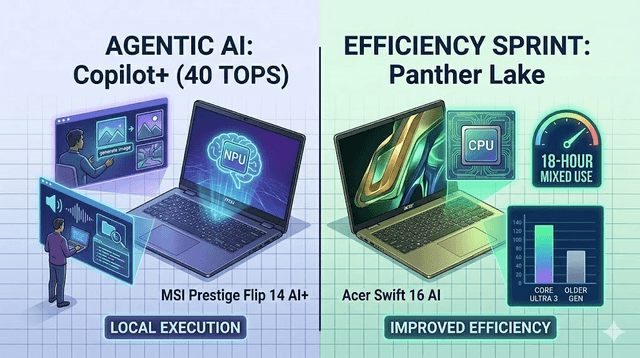
On-device AI is now standard rather than premium. Copilot+ laptops need an NPU delivering at least 40 TOPS, powering offline translation, image generation, and smart search.
1. Apple MacBook Air M5 — Best Overall
For most people, this is the best all-round laptop in 2026. Excellent performance for everyday tasks, creative work, and light development, in a fanless, silent design, with real-world battery consistently over 15 hours. The M5 improves both CPU and GPU meaningfully over the M4. If your work does not require Windows-specific software, this is my first recommendation — and for a lot of light dev work it is plenty.
Screen: 13.6-inch Liquid Retina · Battery: 15+ hours · From: ~$1,099 · Best for: students, professionals, everyday and creative work
2. Apple MacBook Neo — Best Budget Mac
One of the biggest laptop stories of 2026: Apple's most affordable Mac, and the top budget pick for anyone who wants macOS without crossing $1,000. It runs an older chip family than the Air M5 but delivers strong everyday performance for far less. If cost is the constraint and you want a Mac, this is the answer — it fills the role the M1/M2 Airs used to.
From: below $900 · Best for: budget-conscious students and first-time Mac buyers
3. Asus Zenbook S 16 — Best Premium Windows Laptop
Stunning design, excellent all-round performance, and one of the best OLED panels in its price range. Premium build, very comfortable keyboard. Battery is the one soft spot, but for a premium Windows machine that handles design, development, and productivity equally well, it is a strong choice. If you want a Windows alternative to a MacBook Pro, start here.
Screen: 16-inch OLED · Battery: 10–12 hours typical · Best for: pros wanting premium Windows
4. MSI Prestige Flip 14 AI+ — Best Battery Life
If endurance is your top priority, this is extraordinary — reviews clocked over 34 hours of offline video playback, topping nearly everything else. As a 2-in-1 it doubles as a tablet. The display is decent but not class-leading and performance leans toward efficiency, but nothing else competes on battery for people who live away from outlets.
Battery: 34+ hours (video) · Form: 2-in-1 · From: ~$1,299 · Best for: travelers who prioritize battery above all
5. Dell Inspiron 14 Plus — Best Value Windows Laptop
Punches above its price on performance and battery. Regularly cited as the best value in its category and a practical MacBook Air alternative for people who need Windows without flagship pricing. Portable, solid everyday performance, 12–14 hours of battery.
Battery: 12–14 hours · Best for: budget-conscious students and pros who need Windows
6. Acer Swift 16 AI — Best Budget Powerhouse
Intel's latest Panther Lake chip plus up to 18 hours of battery under mixed workloads, on a big OLED that is great for multitasking and media. Reviews dinged the oversized touchpad, but performance and display more than make up for it. A large-screen option with strong performance at an accessible price.
Screen: 16-inch OLED · Battery: up to 18 hours · Best for: multitaskers wanting a big screen affordably
7. Framework Laptop Pro 13 — Best for Repairability
Framework's 2026 redesign is the most repairable, upgradable laptop that finally feels genuinely premium. For anyone who cares about longevity, right-to-repair, and less e-waste, it delivers without major compromises. Competitive battery and performance, and the modular port system is still one of the most practical ideas in laptops. As a developer who hates throwing hardware away, I respect this one a lot.
Best for: sustainability-minded buyers who want long-term upgradeability
How to choose
First question: operating system. macOS is simpler, integrates tightly with iPhone/iPad, and has great battery. Windows is more flexible, runs more software, and offers more hardware at every price. For my Flutter work I want a machine that handles emulators and multiple services smoothly — which pushes me toward more RAM regardless of brand.
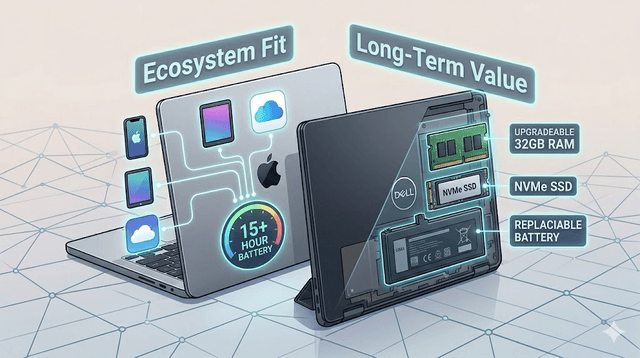
Second question: your primary use case. General users and creatives rarely need more than 16GB RAM and 512GB storage. Developers benefit from more RAM (32GB is ideal for running several services at once) and fast SSDs. Gamers need dedicated GPUs not covered here.
For most people, the MacBook Air M5 or Neo (Apple) and the Dell Inspiron 14 Plus or Acer Swift 16 AI (Windows) cover the vast majority of needs across budgets.
Specs that actually matter
Focus on four: RAM (16GB minimum for smooth multitasking, 32GB if you develop), storage (NVMe SSD), display (OLED if the budget allows), and battery capacity (larger Wh generally lasts longer). Processor benchmarks matter less now that every price tier has a strong option — I would take more RAM over a marginally faster CPU almost every time.
Final recommendation
Do not let spec sheets drive the decision. Match the OS to your existing devices and software, pick a screen size that fits your workspace, and be honest about the battery life you actually need. Then buy the best option in your budget that fits those priorities. There is no single best laptop in 2026 — but there is almost certainly a best one for you.
Common buying mistakes to avoid
- Prioritizing CPU branding over RAM/storage/display quality
- Buying for occasional edge cases instead of your primary daily tasks
- Ignoring ecosystem compatibility with your existing devices
- Overpaying for premium specs that do not improve your actual workflow
Get Weekly AI + Tech Updates
Receive practical AI tools, workflows, and hand-picked resources in one concise weekly email.
Software Developer & Founder
MCA graduate and Flutter developer (web, Android & iOS), writing from hands-on experience with AI and productivity tools.
I'm Mohd Washid, a 23-year-old software developer. I hold a BCA (2022) and an MCA (2024), and I build cross-platform apps with Flutter for web, Android, and iOS. I started AI Tech Minty to share the AI and productivity tools I actually use in my day-to-day development work — cutting through the hype with practical, hands-on guidance you can act on the same day.