Best Standing Desks in 2026: Top Picks for Home Office and Remote Work
Best Standing Desks in 2026: Top Picks for Home Office and Remote Work
The case for a standing desk is no longer controversial. Research consistently shows that prolonged sitting correlates with neck and shoulder pain, reduced focus, and declining energy levels through the day. A study published in the International Journal of Environmental Research and Public Health found that sit-stand desk users reported reduced neck and shoulder pain alongside higher self-rated work performance over a three-month period. For people working eight or more hours daily from a home office, the desk itself is a performance variable that compounds over years.
The good news for buyers in 2026 is that standing desk quality at every price point has improved substantially. Features that used to require $800 or more — dual motors, programmable height memory, anti-collision detection, solid construction — are now available in well-reviewed options under $500. The market is more competitive than it has ever been.
This guide covers the best standing desks across price tiers, with honest assessments of what each one does well and where it falls short.
What to evaluate before buying
Several specifications matter significantly more than the marketing language most manufacturers lead with.
Height range is the most practically important specification. Your desk needs to go low enough for comfortable seated work (typically 26-27 inches for average-height users, lower for shorter people) and high enough for standing with good posture (typically 38-46 inches for most adults, higher for tall users). Measure your own comfortable seated and standing heights before buying, and verify the desk's range covers both.
Stability at standing height determines daily usability more than most reviews emphasize. A desk that wobbles noticeably when you type while standing is irritating in ways that accumulate. Stability depends on frame construction quality, the number of motors, and the desk's weight capacity. In general, heavier desk frames wobble less, and dual-motor designs are more stable than single-motor alternatives.
Motor noise matters for remote workers who take video calls and meetings from their desk. Adjusting desk height during a call should be inaudible to participants. Generally, quieter motors run at 40 decibels or below. Check specifications and user reviews specifically on noise level rather than assuming all electric desks are quiet — some are noticeably loud.
Memory presets allow you to program your exact seated and standing heights and switch between them with a single button press. Most quality standing desks include four memory presets; some budget models include two. This feature is worth having — manually adjusting height every time adds friction that discourages regular standing.
Anti-collision detection stops the desk from descending onto objects below it. This feature is important if you have items you sometimes place under your desk, or if pets or children are ever in your workspace.
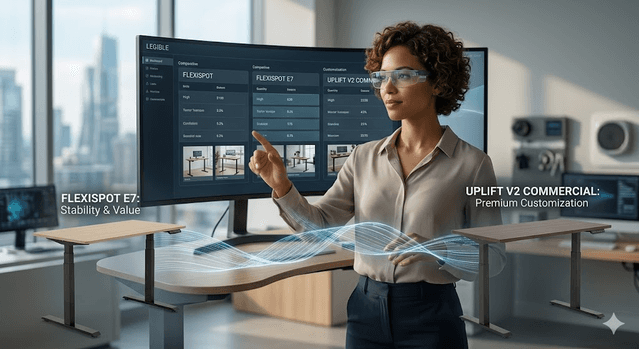
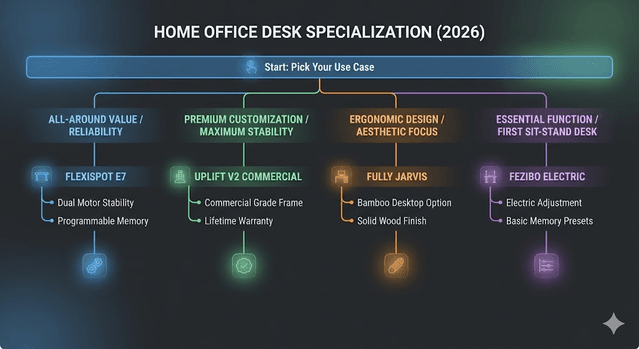
Best overall: FlexiSpot E7 (~$450-$600)

The FlexiSpot E7 is the most consistently recommended standing desk across independent reviews in 2026, appearing at the top of TechRadar's, PC Mag's, and multiple other rankings. The combination of strong stability, a proven dual-motor design, programmable memory, anti-collision detection, and reliable quality control at its price point makes it the safest recommendation for most buyers.
The frame supports up to 355 pounds, handles dual-monitor setups without problematic wobble, and the motor is quiet enough that adjustment during most calls is unobtrusive. The E7 is available as a frame-only purchase or bundled with a desktop — purchasing the frame separately and pairing it with your preferred desktop surface (IKEA tabletops pair well) can reduce cost while maintaining quality.
Best for: Home office workers who want a proven, reliable desk with strong build quality at a mid-range price. The safest first standing desk for most people.
Pricing: $450-$600 depending on desktop configuration and current promotions. Regular sales reduce this significantly.
Best premium: Uplift V2 Commercial (~$800-$1,200+)
The Uplift V2 Commercial is widely considered the benchmark for high-end standing desks in 2026. The commercial-grade frame is impressively stable even at maximum standing height — meaningfully better than lower-tier options when fully loaded with equipment. The height range is broad (22.6 to 48.7 inches), accommodating both very short and very tall users comfortably.
What distinguishes Uplift at this price is the customization depth. Hundreds of desktop material, finish, and size combinations allow genuine personalization. The warranty is strong (lifetime on the frame), and Uplift has maintained a positive track record on customer support and warranty claims — something that matters when purchasing furniture expected to last a decade or more.
Best for: Professionals who spend six or more hours daily at their desk and want maximum stability, extensive customization, and a desk they will keep for many years.
Pricing: $800-$1,200+ depending on configuration. The investment is justified if the desk is your primary work surface for serious daily use.
Best for ergonomic typing: Fully Jarvis (~$519-$800)
Fully's Jarvis is a perennial favorite in standing desk reviews and earns its place through consistent build quality, a broad selection of desktop materials (including a popular bamboo option and solid wood), and Fully's reputation for reliable customer support and warranty service.
The Jarvis's height range (27.5 to 47.5 inches with the standard frame) is solid for most adult heights. Stability is good, though slightly behind the FlexiSpot E7 at comparable price points according to head-to-head testing. The 7-year warranty is one of the more generous in the mid-range segment.
The bamboo desktop option is a genuine differentiator — it looks more premium than standard laminate and handles daily wear well. For buyers who prioritize aesthetics alongside functionality, the Jarvis bamboo combination is one of the best-looking desks at this price.
Best for: Users who want premium desktop material options, particularly the bamboo surface. A strong choice for anyone who values the desk's aesthetic in a home office that is also a living space.
Pricing: $519-$800 depending on size and material choice.
Best budget standing desk: Fezibo Electric (~$200-$300)
Not everyone needs or wants to spend $500 on a standing desk. The Fezibo Electric delivers the essential functionality — electric height adjustment, programmable memory presets, and adequate stability for single-monitor setups — at a price that removes the financial barrier to trying sit-stand working.
Build quality is not at the level of FlexiSpot or Uplift. The frame is lighter, wobble at full standing height is more noticeable (particularly with heavier setups), and the warranty coverage is shorter. But for a first standing desk, a secondary workspace, or a setup where budget is the primary constraint, the Fezibo provides genuine value.
Best for: First-time standing desk buyers who want to try the concept before committing more. Secondary workspaces, student setups, and budget-constrained buyers.
Pricing: $200-$300 depending on size and current promotions.
Best for gamers: Secretlab Magnus Pro (~$700-$800)
The Secretlab Magnus Pro is designed specifically around gaming and streaming setups. Its cable management system — integrated magnetic channels for routing cables cleanly — is among the best available in any standing desk. For setups with multiple monitors, gaming peripherals, streaming equipment, and consoles, the Magnus Pro's cable management alone justifies serious consideration.
The desk surface is a metal top with a built-in magnet system that holds compatible accessories in place without adhesives or clamps. Build quality and finish quality are premium. The motor is quiet, the frame is stable, and the overall aesthetic is distinctive and high-quality.
Best for: Gamers and content creators who need a stable, cable-managed desk with a premium finish designed for complex multi-device setups.
Pricing: $700-$800 depending on configuration.
Best L-shaped: Vari L-Shape Electric (~$800-$1,000)
L-shaped standing desks serve a specific need — users who want large continuous desk surface for multiple monitors, a secondary workstation, or simply more space than a standard rectangular desk provides. The Vari L-Shape Electric is one of the most consistently recommended options in this category.
A distinctive feature is the flexible L configuration: the shorter portion can be positioned on either the left or right side depending on your room layout — a practical advantage over L-desks with a fixed orientation. The desk uses a tri-motor design (one per leg plus one for the joint), producing smooth, even height adjustment across the large surface.
Best for: Users who need large desk surface — dual-monitor setups, creative professionals working with multiple inputs, or anyone who simply prefers more workspace.
Pricing: $800-$1,000 depending on configuration.
Standing desk converters: when a full desk is not practical
If replacing your current desk is not feasible — renting, shared spaces, or apartment living where desk replacement is impractical — a standing desk converter sits on top of your existing desk and raises your monitor and keyboard simultaneously.
The FlexiSpot M2B and VIVO desk converters receive consistently positive reviews in the $150-$300 price range. The trade-off compared to a full sit-stand desk is ergonomics: converters raise the monitor and keyboard together, which can create compromises since the optimal monitor height and keyboard height differ for most users. They work, and they are significantly cheaper than a full desk replacement, but the ergonomic result is not as good as a purpose-built adjustable desk.
Essential accessories for standing desk users
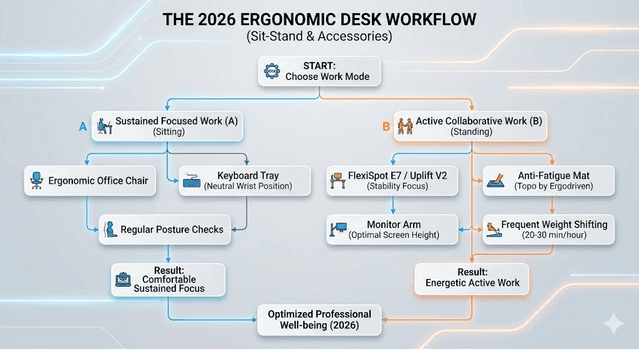
A standing desk alone does not guarantee comfortable standing. Two accessories significantly improve the standing experience:
Anti-fatigue mat. Standing on a hard floor for extended periods creates discomfort and discourages standing time. An anti-fatigue mat — the Topo by Ergodriven and similar contoured designs are well-reviewed — makes multi-hour standing significantly more comfortable by encouraging subtle weight shifting.
Monitor arm. A monitor arm allows you to position your screen at exactly the right height and distance for both seated and standing positions, independent of the desk surface. Without one, your monitor sits on the desk and its height relative to your eyes changes as the desk moves, which can create neck strain. A monitor arm is a $30-$100 investment that significantly improves ergonomics for standing desk users.
Making the standing habit stick
The most common mistake with standing desks is standing too long when first transitioning. Starting with 20-30 minutes of standing per hour and gradually increasing from there prevents the leg fatigue that causes many new standing desk users to return to sitting exclusively.
Use the memory presets. If switching heights requires manual adjustment each time, friction discourages the habit. Program your seated and standing heights the first day and use preset buttons from then on — the ease of one-button switching is what enables frequent transitions throughout the day.
Aim for a 1:1 ratio of standing to sitting time as a long-term target, though any regular standing is an improvement over exclusively sitting. Set a timer or use a smart watch reminder to stand if you find yourself forgetting — the habit takes several weeks to become automatic.
The best standing desk is the one that matches your setup requirements and budget while delivering enough stability and quality to be used daily for years. Start with the FlexiSpot E7 if you want the safest all-around choice, step up to Uplift if daily intensive use justifies the premium, or start with Fezibo if you want to try the concept without significant financial commitment.
Get Weekly AI + Tech Updates
Receive practical AI tools, workflows, and hand-picked resources in one concise weekly email.
Tech Reviews & Productivity Writer
Abhishek is a software engineer with a bachelor's degree in computer science. He covers consumer tech reviews and productivity systems, focusing on real-world comparisons of devices and apps and on practical workflows that help people get more done without buying into hype.