Best Budget Laptops Under $500 in 2026: Tested and Ranked
Best Budget Laptops Under $500 in 2026: Tested and Ranked
Budget laptops have a reputation they no longer deserve. A few years ago, spending under $500 meant accepting a sluggish processor, a dim display, plastic that creaked under light pressure, and battery life that barely lasted through a lunch break. In 2026, that picture has changed substantially.
The combination of improved low-power processors, better display panels at entry price points, and the maturation of Chrome OS as a serious productivity platform means you can now spend $300 to $500 and get a laptop that handles everyday work, school, and streaming without meaningful frustration. The compromises are real — we will be honest about them — but they are no longer deal-breakers for most buyers.
This guide covers the best options under $500 in 2026, tested for real-world performance rather than just spec comparisons.
What to look for in a budget laptop
Before reviewing specific picks, understanding what actually matters at this price point saves you from being distracted by irrelevant specs.
RAM is the single most important spec. Aim for at least 8GB. Below that, multitasking becomes genuinely painful — browser tabs reload constantly, and switching between apps creates visible delays. Most budget laptops in 2026 ship with 8GB as the baseline; some offer 16GB configurations at the upper end of the price range.
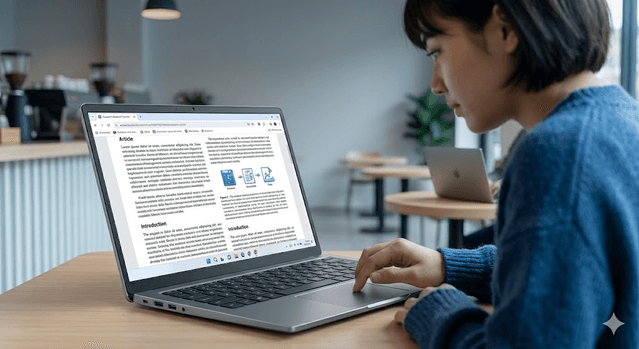
Display resolution matters more than most buyers realize. A 1080p IPS panel produces clear enough text and image quality for daily work and media consumption. Anything lower makes extended use tiring. Avoid screens listed only as "HD" without specifying 1080p.
Storage type affects perceived speed dramatically. An SSD, even a basic one, makes a budget laptop feel significantly faster than a spinning hard drive at any spec level. If a laptop still uses an HDD in 2026, pass on it regardless of other specs.
Battery life claims from manufacturers are optimistic. Look for real-world test data. Chromebooks consistently outperform Windows laptops in this category at the budget tier — 12 to 13 hours tested versus 6 to 8 hours for equivalent Windows machines.
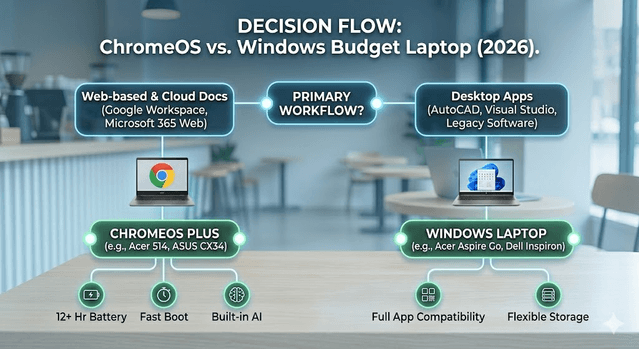
ChromeOS vs Windows is the most consequential choice at this price. Chromebooks are simpler to maintain, faster to boot, longer on battery, and sufficient for web-based work, Google Workspace, and Android apps. If your workflow requires Windows-specific software — AutoCAD, Visual Studio, Adobe's desktop apps, specialized business software — a Chromebook will not serve you regardless of its other qualities.
Best overall budget laptop: Acer Aspire Go 15
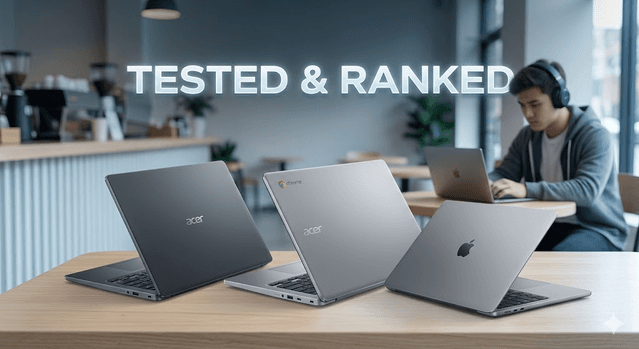
The Acer Aspire Go 15 at $299 to $449 depending on configuration is the most recommended budget Windows laptop of 2026 across multiple independent testing publications. The core value proposition is straightforward: a 15.6-inch full HD display, Intel Core processor, 8GB DDR5 RAM, and enough storage for everyday files at a price that undercuts much of the competition.
What makes it stand out is not any single flashy feature but the absence of serious weaknesses. The keyboard is comfortable for extended typing. Port selection is generous for the price, including USB-A, USB-C, and HDMI without needing adapters. Build quality is all plastic, as expected at this price, but it is assembled in a way that does not creak or flex under normal use.
The honest limitations are battery life — expect six to seven hours in real use, which covers most workdays but not long travel days — and a display that is clear and bright enough for daily use without being an OLED or high-refresh-rate panel. For students, remote workers with web-based workflows, and anyone who needs a reliable everyday machine, the Aspire Go 15 is the safest choice under $500.
Best Chromebook: Acer Chromebook Plus 514 or ASUS Chromebook Plus CX34
The Chromebook Plus designation from Google indicates a minimum hardware standard: Intel Core i3 or AMD Ryzen equivalent, 8GB RAM, 1080p display, and a set of AI features built into ChromeOS. Both the Acer Chromebook Plus 514 and the ASUS Chromebook Plus CX34 meet and exceed those requirements.
Battery life is where these laptops separate themselves from Windows competition at the same price. The Acer Chromebook Plus 514 tested at nearly 13 hours in video playback benchmarks — outperforming every Windows laptop tested under $500 by a significant margin. No Windows machine at this price exceeded 8.5 hours in equivalent testing.
The AI features built into ChromeOS in 2026 are more useful than they appear on paper. Real-time captioning for any video, background removal in the built-in photo editor, text assistance in Gmail and Google Docs, and wallpaper generation are available out of the box without subscriptions. These features were reserved for premium notebooks in previous years.
The Chromebook Plus 514 at $349 to $399 is the pick for buyers whose workflow is primarily cloud-based, who value battery life above all else, and who do not need Windows-specific software.
Best surprise entry: Apple MacBook Neo
Apple releasing a laptop at $599 was not expected, but the MacBook Neo is real and it has changed the conversation around budget laptops. Powered by the A19 Pro chip with 8GB memory and a 256GB SSD, it delivers more than 13 hours of tested battery life and a 13-inch Liquid Retina display at 2408×1506 resolution in an all-aluminum chassis that feels nothing like any other sub-$600 laptop on the market.
It is the most affordable MacBook ever made. The educational discount drops it to $499, which brings it technically within the under-$500 category. For students and buyers who are already in the Apple ecosystem — iPhone, AirPods, iCloud — the MacBook Neo removes the price barrier that previously made Apple laptops inaccessible.
The limitation is macOS compatibility with non-Apple software. If your school or employer requires Windows-only applications, the MacBook Neo does not solve that. For everyone else, the build quality, display, battery life, and ecosystem integration are simply better than any Windows or Chromebook alternative in this price range.
Best 2-in-1 under $500: Lenovo IdeaPad Flex 5i Chromebook Plus
The Lenovo IdeaPad Flex 5i Chromebook Plus at $349 to $450 is the best convertible laptop at this price point. The 2-in-1 design flips all the way around for tablet use, which is genuinely useful for reading, drawing with a stylus, and watching video in tent mode.
Build quality is solid for the price — firmer hinges and better materials than competing convertibles under $400. The display is 1080p, battery life falls in the Chromebook range of 10 to 12 hours tested, and the keyboard is comfortable for the 14-inch form factor.
If you want versatility and do not need the largest screen, the Flex 5i Chromebook Plus offers the most flexibility in the under-$500 tier.
Best Windows reliability pick: Dell Inspiron 15 3520
The Dell Inspiron 15 3520 at $449 to $500 is not the most exciting laptop on this list but it is one of the most dependable. Dell's support network, driver reliability, and brand track record for business use make it a solid choice for remote workers who need a machine that simply works, connects to their employer's VPN without driver conflicts, and can be serviced or replaced through business support channels.
Performance is adequate for everyday work. Battery life is honest at around seven hours. Display quality is comparable to the Acer Aspire Go 15. What Dell adds is brand reliability, solid keyboard ergonomics developed over many business laptop generations, and the comfort of knowing you can call a support line if something goes wrong.
Final buying guide
If your entire workflow runs in a browser and you value battery life: get the Acer Chromebook Plus 514.
If you want the best all-around Windows machine: get the Acer Aspire Go 15 in the 16GB RAM configuration if available.
If you are in the Apple ecosystem and can stretch to $599: the MacBook Neo is worth every dollar over the competition.
If you need a convertible tablet-laptop: the Lenovo IdeaPad Flex 5i Chromebook Plus.
If you want Windows with familiar brand reliability for work: the Dell Inspiron 15 3520.
One final piece of advice that applies to every pick on this list: pair whichever laptop you choose with an external monitor if you work from home. A 24-inch 1080p display costs $80 to $120 and transforms the experience of any budget laptop into something genuinely comfortable for full-day work.

Get Weekly AI + Tech Updates
Receive practical AI tools, workflows, and hand-picked resources in one concise weekly email.