Cybersecurity in 2026: The Biggest Threats and How to Protect Yourself
Cybersecurity in 2026: The Biggest Threats and How to Protect Yourself
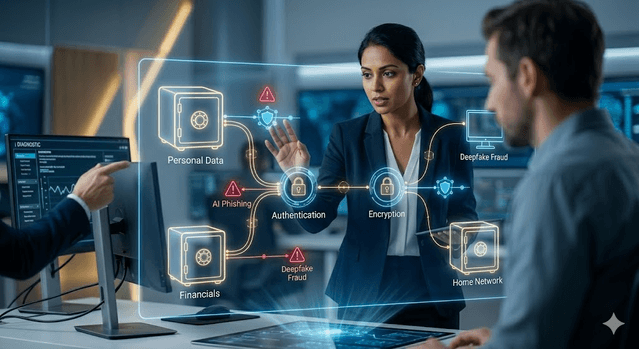
As a developer I think about security more than most people, and honestly, the threat landscape in 2026 makes me glad I built good habits early. AI-generated phishing emails are now indistinguishable from real business mail. Ransomware is increasingly automated. Deepfakes can convincingly impersonate an executive or a family member. The old advice to just "be careful" no longer cuts it without specific protective habits.
The good news, and I mean this: the most effective defenses are neither complicated nor expensive. A small set of habits — strong authentication, consistent updates, and phishing awareness — stops the overwhelming majority of real attacks. The challenge is consistency, not complexity. These are the habits I actually run, and recommend to everyone who asks me.
Threat-to-defense quick map
| Threat | Typical Attack Path | Highest-Impact Defense |
|---|---|---|
| AI phishing | Fake login links, urgent account alerts | MFA + verify via separate channel |
| Credential stuffing | Reused passwords from old breaches | Unique passwords in a password manager |
| Ransomware | Malicious attachment or unpatched system | Frequent backups + automatic updates |
| Deepfake voice/video fraud | Urgent social engineering calls | Pre-agreed verification phrase/process |
| Identity theft | Data broker exposure + stolen personal data | Credit freeze + transaction alerts |
What actually changed in 2026
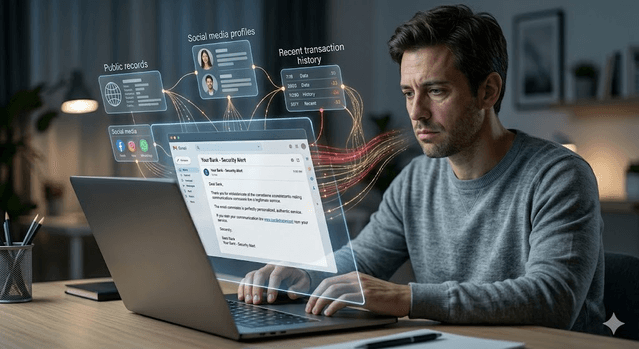
AI-powered phishing is the biggest shift for regular users. Phishing used to give itself away with bad grammar and generic greetings. Now it is personalized, grammatically perfect, and contextually convincing — referencing your recent transactions or your employer, assembled from data brokers, social media, and old breaches. I have seen examples good enough that I had to slow down and check, and I do this for a living.
Ransomware got more targeted and automated. Instead of mass spam, operators now use AI to find which targets hold the most valuable data and when to strike. For individuals, home network devices — routers, smart home gadgets, NAS drives — are increasingly the entry point.
Deepfake fraud is operationally viable now. Attackers can generate real-time voice and video convincing enough to trick people into transferring money or sharing credentials. Deepfake "CEO fraud" is documented across industries, and for individuals, a deepfake voice call impersonating a family member in an "emergency" is an emerging scam.

Attacks on critical infrastructure — healthcare, utilities, finance — keep escalating. Most individuals are not directly targeted, but the downstream breaches and outages affect millions.
Quantum computing is not a mainstream attack tool yet, but its anticipated arrival is already reshaping long-term planning. Organizations sitting on data that must stay secret for a decade-plus are moving to quantum-resistant encryption now, on the assumption that today's encrypted data could be broken later.
The five actions that stop most attacks
These are not complicated technical steps. They are habits, and they are the ones I actually keep.
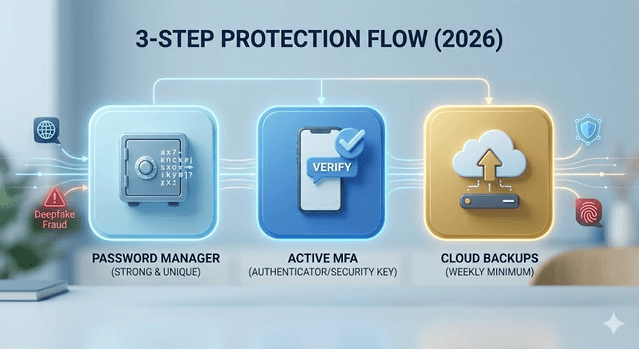
Use strong, unique passwords with a password manager. Password reuse is a leading cause of account compromise — one breach cascades into your email, banking, everything. A manager generates and stores a random password per account so a single breach stays contained. I use one for every login, no exceptions. Bitwarden and 1Password both have solid free tiers.
Enable multi-factor authentication (MFA) everywhere important. Even with your password, an attacker is blocked without the second factor. Prioritize email first — it controls password resets for everything else — then banking, then anything with personal or financial data.
Keep everything updated. Updates patch the exact vulnerabilities attackers scan for. Turn on automatic updates for your OS, browser, apps, and router firmware. As a developer I can tell you: an unpatched device is a known broken window, and bots are constantly checking for it.
Be skeptical of urgency. The one common thread across phishing, scam calls, and social engineering is manufactured urgency — "verify in 24 hours or your account closes." Pressure to act immediately without time to verify is the red flag. When something makes me feel rushed, that feeling itself is my cue to slow down.
Back up important data. Ransomware encrypts your files and demands payment. A recent backup kept separate from your main device — cloud, a disconnected external drive, or both — means your data cannot be held hostage. Back up weekly at least, and actually test a restore once a year (most people never do, and find out too late).
Protecting against AI phishing specifically
"Check for bad grammar" is dead advice against AI attacks. Updated habits:
Verify through a separate channel before acting. If your "bank" emails you a link, close it and contact them via a number from their official site — never a number in the suspicious message.
Check links before clicking. Hover to see the real URL. Phishing uses lookalikes — paypal-security.com instead of paypal.com.
Be careful with attachments. An unexpected file, even from someone you know, can run malware. Verify through another channel first.
Use email aliases. Separate addresses for banking, shopping, and newsletters limit breach damage and make phishing aimed at your financial accounts easier to spot.
Protecting your home network
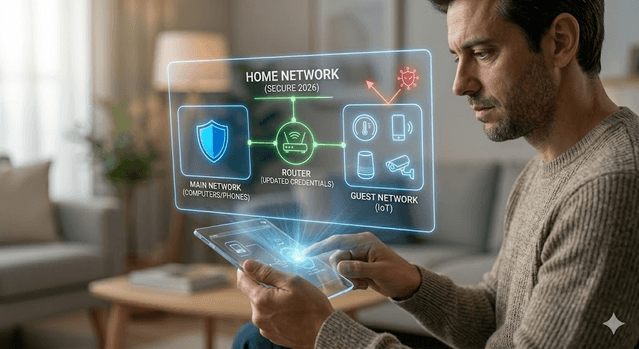
Your router is the gateway to every device in your home. A compromised one can intercept traffic and redirect you to fake sites even when you type the right address. Change the default admin credentials immediately — defaults are publicly documented and routinely exploited. Update firmware when available. Put smart home devices on a separate guest network so a weak gadget cannot reach your computers and phones.
And honestly, ask whether an always-on mic/camera device is worth the trade-off. At minimum, isolate it.
Identity protection basics
Your personal info sits on hundreds of data broker sites, assembled from public records. It feeds phishing, identity theft, and social engineering.
Freeze your credit at all three major bureaus — it blocks new accounts in your name even if a thief has your details, it is free, and it takes minutes. Consider a data broker removal service (the info resurfaces, so ongoing removal beats a one-time request). And enable real-time transaction alerts on your cards — catching fraud in hours instead of weeks changes the outcome.
Common mistakes to avoid
- Enabling MFA on banking but not email (email is the reset path for everything)
- Keeping backups permanently connected, so ransomware encrypts them too
- Trusting caller ID or a familiar voice without independent verification
- Delaying router and browser updates for months
- Reusing one "strong" password across services
A simple priority order
Starting from scratch, do these in order: set up a password manager and reset important passwords to unique random ones; enable MFA on email, banking, and anything sensitive; turn on automatic updates and check router firmware; freeze your credit at all three bureaus; set up automated backups; then prune unused accounts, because fewer accounts means fewer attack surfaces.
This is not one-and-done. A 30-minute review every few months — unused accounts, backups working, unfamiliar activity — is genuinely enough for most people. The threats are real and growing, but so are the tools. You do not need to be technical to protect yourself well. You need consistent habits and a healthy suspicion of anything demanding immediate action.
Get Weekly AI + Tech Updates
Receive practical AI tools, workflows, and hand-picked resources in one concise weekly email.
Software Developer & Founder
MCA graduate and Flutter developer (web, Android & iOS), writing from hands-on experience with AI and productivity tools.
I'm Mohd Washid, a 23-year-old software developer. I hold a BCA (2022) and an MCA (2024), and I build cross-platform apps with Flutter for web, Android, and iOS. I started AI Tech Minty to share the AI and productivity tools I actually use in my day-to-day development work — cutting through the hype with practical, hands-on guidance you can act on the same day.