How to Use ChatGPT for Daily Productivity: A Practical Guide

How to Use ChatGPT for Daily Productivity: A Practical Guide
For a while I used ChatGPT the way most people do — ask a question, get an answer, move on. Useful, but it never really moved the needle on my week. The shift happened when I stopped treating it as a search box and started building a small, repeatable routine around it. As a developer juggling features across web, Android, and iOS, that routine is what actually keeps my days from turning into scattered context-switching.
This is the system I run, minus the over-engineered prompt worship you see online. It is meant to reduce friction, not replace your judgment.
Productivity impact map
| Workflow Step | ChatGPT Role | Typical Benefit | Risk to Avoid |
|---|---|---|---|
| Morning planning | Convert raw tasks into time-aware plan | Better prioritization | Overloading day plan |
| Deep work support | Resolve blockers in batches | Protects focus | Constant chat interruptions |
| Communication tasks | Rewrite drafts for clarity and tone | Faster messaging | Sending unverified output |
| Evening review | Reflect and adjust next day | Better consistency | Skipping manual judgment |
Start with a daily operating framework
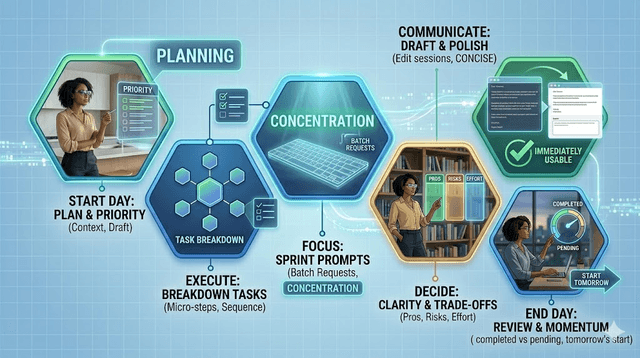
Productivity is not about doing more — it is about making fewer decisions over and over. I use ChatGPT as a thinking partner at four points: morning planning, focused work blocks, communication, and evening review. The goal is consistency. Run the same loop for two weeks and you will quickly see where it helps and where your own judgment should lead.
Morning planning in 10 minutes
I start by giving it my task list, the hours I actually have, and my one priority outcome, then ask for a realistic schedule with buffers. "Realistic" is the key word — most plans fail because they assume perfect energy and zero interruptions, which never survives contact with a real bug.
A format I use:
I have 6 hours of focused work. Tasks: [list].
Top outcome: [goal]. Build a practical schedule with deep work blocks,
admin blocks, and 15-minute buffers.
Then I edit it manually. I keep ownership of the final call.
Turn vague work into concrete steps
When a task feels heavy — the classic "I don't even know where to start" — I ask for a startable checklist instead of a vague "help me with this." For code, that might be "break this feature into the smallest shippable steps." Concrete steps kill the resistance and I start moving faster.
Use focused sprint prompts
During deep work I do not keep ChatGPT open as a companion. Interrupting my own flow every few minutes wrecks focus — for developers especially, regaining context after an interruption is expensive. So I keep a note called "Ask Later," dump questions into it while I work, and clear them in one short batch between sprints. This protects concentration and keeps my head on the actual task.
Handle communication faster
This is a quiet time-saver. I paste a rough draft, give a target tone, and ask for two concise versions — client replies, team messages, follow-ups that otherwise eat more time than they should.
Rewrite this message in a clear, professional tone.
Keep it under 120 words.
Preserve the key ask and the deadline.
Build recurring templates
The compounding effect comes from templates. I save my best prompts for planning, writing, and communication so I stop rewriting instructions every time. Mine include daily planning, meeting summary with action items, draft-to-polish email rewriting, and a weekly retrospective. I keep them in one doc and refine it monthly.
Use it for decision clarity
When I am stuck between options — which library, which approach, which course — I ask it to lay out the trade-offs against clear criteria: pros, risks, effort. I do not ask it to decide. I ask it to structure my thinking so the decision gets obvious. A better decision usually saves more time than executing a task slightly faster.
End the day with a five-minute review
Evening review is where the improvement actually happens. I give it three things — what I finished, what slipped, and the one obstacle — and ask for a short summary plus one adjustment for tomorrow. That turns productivity into a feedback loop instead of a daily reset.
Common mistakes to avoid
The first is using AI for trivial things you could do faster yourself. The second is accepting output without checking it — I have caught it confidently wrong plenty of times. The third is writing giant prompts for everything; short and specific usually wins. And the last is tool-hopping: if your workflow works, stop switching systems every week. Stability builds better habits.
Who this is for
This works best for students, freelancers, developers, and knowledge workers managing several deliverables a day. If your role is nonstop real-time response, adapt it into shorter planning and review cycles rather than long deep-work blocks.
A practical daily example

A normal weekday for me looks roughly like:
- 8:30 AM: planning prompt and schedule draft
- 9:00–11:00 AM: deep work block one
- 11:00 AM: blocker-resolution batch
- 11:15–1:00 PM: deep work block two
- 2:00 PM: communication and admin with AI rewriting
- 5:30 PM: five-minute review and picking tomorrow's first task
Simple enough to repeat, flexible enough to adapt.
Final takeaway
ChatGPT improves productivity when it supports a system — not when it becomes the system. Use it to cut friction, clarify the next action, and speed up repetitive communication, while keeping your goals and judgment in charge. Run the framework above for one week and you will notice two things immediately: faster task starts and cleaner planning. That alone changed my output without adding hours to my day.
Get Weekly AI + Tech Updates
Receive practical AI tools, workflows, and hand-picked resources in one concise weekly email.
Software Developer & Founder
MCA graduate and Flutter developer (web, Android & iOS), writing from hands-on experience with AI and productivity tools.
I'm Mohd Washid, a 23-year-old software developer. I hold a BCA (2022) and an MCA (2024), and I build cross-platform apps with Flutter for web, Android, and iOS. I started AI Tech Minty to share the AI and productivity tools I actually use in my day-to-day development work — cutting through the hype with practical, hands-on guidance you can act on the same day.