Best AI Tools for Students in 2026 (Free + Paid)

Best AI Tools for Students in 2026 (Free + Paid)
I finished my MCA in 2024, so the "study smarter" problem is still fresh for me — and honestly, I wish these tools had been as good when I started my BCA. Back then AI mostly wrote generic essays you had to fix anyway. Now, used properly, they genuinely help you understand faster, organize messy notes, and revise more efficiently.
The trap I see students fall into is the same one I did: installing ten apps and drowning in tabs. That is not a system, it is noise. What actually worked for me was a small, focused stack where each tool does one job well. This is that approach — with honest notes on when a paid plan is worth your (limited) student money and when the free tier is plenty.
Quick comparison by use case
| Tool | Best For | Free Plan Quality | Main Limitation |
|---|---|---|---|
| ChatGPT | Concept explanation, outlines, practice questions | Strong | Better reasoning often needs paid tier |
| Gemini | Google Workspace-native workflows | Good | Depth can vary by topic |
| Perplexity | Research starting points with links | Strong | Sources still require manual validation |
| Notion AI | Organizing notes and plans | Good | Works best only if you already use Notion heavily |
| Grammarly | Final writing polish | Good | Not a substitute for argument quality |
| Quizlet + memory tools | Flashcards and spaced repetition | Good | Output quality depends on note quality |
How to actually choose
Before you install anything, name your real bottleneck. Are you losing marks because concepts do not click, because your writing is unclear, or because you run out of time? Be honest — for me it was time management, so tools that planned and summarized helped more than another chatbot. AI pays off most when it targets one specific weakness first.
Then judge tools on four things: output quality (accurate for your context, not just fluent), speed (study sessions are time-boxed), source transparency (do you need to cite?), and price (a student budget should only fund high-value subscriptions).
And the big one: do not let AI replace the learning. If it does the whole assignment, you submit faster and understand less — which caught up with me on exams the one time I leaned on it too hard. Use it to explain, to draft outlines, and to test yourself, then write your own final work.
1) ChatGPT for guided learning and writing
This is the most flexible study tool I used. The free tier covers a lot: clarifying concepts, building revision quizzes, summarizing long readings, turning rough notes into structured outlines. A paid plan is worth it only if you need stronger reasoning, longer context, or you are using it every single day.
Where it helped me most:
- Breaking a hard topic into beginner, intermediate, and exam-level explanations
- Turning lecture notes into active-recall questions
- Improving assignment structure without flattening my own voice
- Brainstorming project ideas within real constraints
My go-to pattern is context + goal + format + constraints. For example: "I'm a first-year CS student. Explain recursion simply, then give two medium examples, then five practice questions with answers hidden at the end." That beats a vague ask every time.
2) Gemini for Google-first students
If your college runs on Gmail, Docs, Slides, and Drive, Gemini fits right in. It summarizes email threads, turns class notes into slide outlines, and cleans up documents without the copy-paste dance. Students on Android or collaborating in Google Docs tend to adopt it fastest because it lives where their work already is.
Strong for:
- Turning scattered notes into concise summaries
- Drafting first-pass slide structure
- Explaining technical topics with multiple examples
- Managing context across Google apps
Its edge is integration, not always the deepest reasoning. Pair it with your own checking and edits.
3) Perplexity for research and citations
I used to burn hours checking whether a claim was trustworthy. Perplexity helps because it puts sources front and center — you get an answer and links you can actually open. That is a real time-saver for literature reviews and current-event assignments.
Use it for fast overviews with sources, starting points for deeper reading, and citation discovery. But do not copy citations blindly — open the key links, confirm relevance, and check the date. A source-backed answer is a strong start, not automatic proof.
4) Notion AI for knowledge management
If you already keep notes in Notion, its AI is handy for cleanup: turning a messy lecture dump into a readable summary, pulling out action items, generating a revision checklist. It is less "smart answers" and more "less friction in your own system." If you dislike building systems it will feel heavy — but if you like structure, it becomes a command center.
5) Grammarly for final polish
Good ideas still lose marks to unclear writing. Grammarly is worth it for grammar, clarity, and tone — especially on scholarship essays, cover letters, and professional emails where the language quality directly affects the outcome. Use it at the end, though. Draft first, fix your logic, then polish. Do not let it sand down your intent early.
6) Quizlet and memory tools
Memory still matters for exams, and AI can generate flashcards from notes in seconds. But the cards are only as good as your notes — weak notes make weak cards. Review what it generates and cut anything vague. What worked for me was AI-generated cards plus short daily spaced-repetition sessions, which beat last-minute cramming by a mile.
Free vs paid: where it's actually worth it
Free tools are enough for most students if you use them consistently. I only paid when: I was using a tool daily for core work, better reasoning clearly saved time, I needed longer context, or one subscription replaced several smaller tools. Do not pay for three overlapping assistants. Test on free plans for two weeks, then commit to one.
A lean student stack
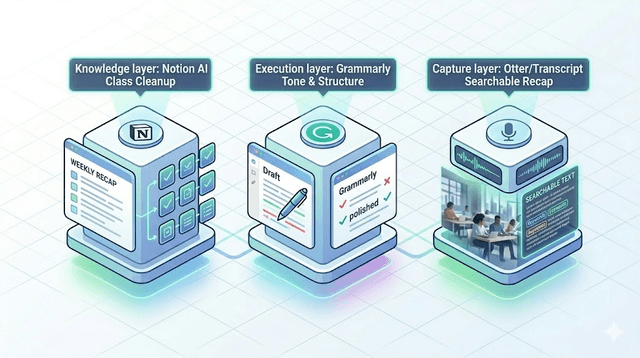
For most learners this is enough:
- One general assistant (ChatGPT or Gemini)
- One research tool (Perplexity)
- One writing polisher (Grammarly or built-in help)
- One note system (Notion, Obsidian, or a Google Docs workflow)
That covers understanding, research, output quality, and organization without the overhead.
Mistakes to avoid
Over-automation kills comprehension — I learned that the hard way before an exam. Tool-hopping creates overhead and weak habits. Trusting output without verification burns you on formulas and dates. And ignoring your own context — course level, deadline, format — wastes even a good prompt. Good inputs make good outputs.
Who this is for (and not)
This stack is for students who want to understand more and work faster while still doing original work. It is not for anyone trying to fully automate assignments — that path costs you the skills that matter after graduation, which I can tell you firsthand are the whole point.
Final verdict
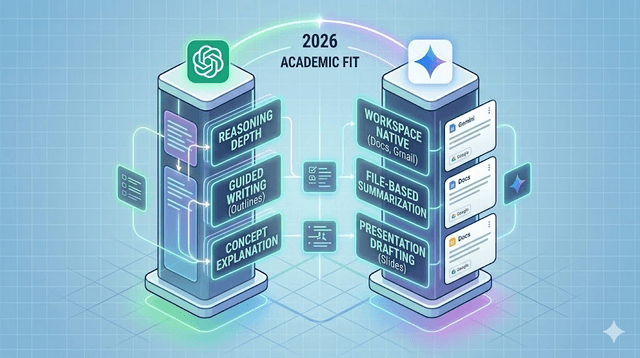
The best student tools in 2026 are not the loudest — they are the ones that fit your real workflow and keep you consistent week after week. Start with ChatGPT or Gemini for daily support, add Perplexity for sourced research, and keep one writing or memory layer for finishing quality. Lean stack, real learning, better work in less time.
Get Weekly AI + Tech Updates
Receive practical AI tools, workflows, and hand-picked resources in one concise weekly email.
Software Developer & Founder
MCA graduate and Flutter developer (web, Android & iOS), writing from hands-on experience with AI and productivity tools.
I'm Mohd Washid, a 23-year-old software developer. I hold a BCA (2022) and an MCA (2024), and I build cross-platform apps with Flutter for web, Android, and iOS. I started AI Tech Minty to share the AI and productivity tools I actually use in my day-to-day development work — cutting through the hype with practical, hands-on guidance you can act on the same day.