ChatGPT vs Gemini in 2026: Which AI Assistant Should You Use?

ChatGPT vs Gemini in 2026: Which AI Assistant Should You Use?
I use both of these every day. As a developer, ChatGPT and Gemini are open in my browser more than almost anything else — for debugging, for explaining code I did not write, for drafting docs, and for the boring admin around a project. So this is not a spec-sheet comparison pulled from launch blogs. It is what I have actually noticed switching between the two for real work.
The honest answer up front: in 2026 both are good. Neither is going to embarrass you. The real question is which one fits your workflow, your budget, and the tools you already live in.
Head-to-head quick table
| Criteria | ChatGPT | Gemini |
|---|---|---|
| Long-form reasoning | Strong | Good |
| Google Workspace integration | Moderate | Strong |
| Content drafting quality | Strong | Good |
| Cross-platform workflow flexibility | Strong | Good |
| Best-fit user profile | Mixed-tool users and writing-heavy workflows | Google-native users in Docs/Gmail/Drive |
The short answer
Pick ChatGPT if you want flexible reasoning, strong drafting, and one assistant that adapts across a lot of different tasks. It is my default for anything involving code or long, back-and-forth thinking.
Pick Gemini if your day already runs inside Google Workspace. When my work is sitting in Docs, Gmail, and Drive, Gemini saves me the copy-paste tax.
For me it is not "one forever." It is one primary plus the other for what it is genuinely better at.
The criteria that actually matter
I stopped judging these tools by viral demos a long time ago. What matters in real use is five things:
- Output quality for your kind of task
- Reliability and speed
- How well it fits into tools you already use
- Value for the price
- How little friction it takes to adopt
A model that wins demos but loses in your actual workflow is the wrong model.
Reasoning and explanation
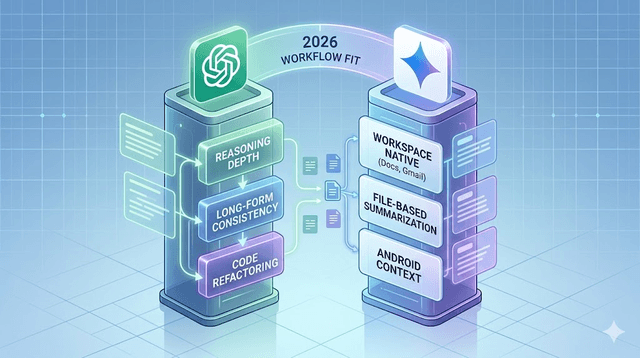
When I am working through something layered — a tricky bug, an architecture decision, or a long draft I keep refining — ChatGPT holds a multi-step conversation more consistently for me. It handles "no, not like that, try this instead" without losing the thread, which matters a lot when I am reasoning through code.
Gemini has genuinely closed the gap and does well on conceptual explanations, especially when I structure the prompt clearly. Where it really shines is transforming something that already lives in a Google product.
My verdict: ChatGPT edges it for extended reasoning; Gemini is excellent for ecosystem-bound tasks.
Speed and session flow
Both are fast for normal stuff. The difference shows up in long sessions and at peak times. In a heavy back-and-forth editing session ChatGPT usually feels smoother to me, while Gemini feels fastest when I am working inside a Google interface and not tab-hopping.
My verdict: roughly a tie on raw speed; Gemini feels faster in Workspace-native flows.
Integration and ecosystem
This is Gemini's home turf. If your tasks already sit in Gmail, Docs, Sheets, and Android, Gemini meets you there and you stop shuffling text between tabs. On days when I am writing documentation in Docs, that convenience is real.
ChatGPT stays my pick as a neutral, standalone assistant across mixed tools — which describes most of my dev work, since my stack is not all Google.
My verdict: Gemini for Google-first people; ChatGPT for cross-platform workflows.
Coding and technical help
This is the one I care about most, and where I have the strongest opinion. For debugging walkthroughs, refactors, and architecture brainstorming, ChatGPT is my first stop — it explains why, not just what, which is what I actually need when I am stuck. Gemini has improved a lot and is perfectly capable for straightforward coding tasks, and it is handy when the code already lives in a Google-adjacent flow.
My honest advice: test both on your real stack. My work is Flutter across web, Android, and iOS, and the two models are not identical on platform-specific quirks. What wins for me might not win for your language.
My verdict: ChatGPT for deeper coding dialogue; Gemini competitive for day-to-day help.
Writing and drafting
For first drafts, structure, and long-form revision, ChatGPT usually gives me cleaner output with less prompt-tuning. Gemini gets there too but often needs tighter formatting constraints from me to match. Either way — and I cannot stress this enough — I edit everything. Neither one gets published raw.
My verdict: ChatGPT generally leads for writing-heavy work.
Research and facts
Both summarize and explain well, but accuracy still depends on how you prompt and whether you verify. I have been burned by confident, wrong answers from both. My habit now: use the assistant for the framework and the questions to ask, then verify the actual facts before I rely on them.
My verdict: trust neither blindly; your process matters more than the brand.
Pricing and value
Free tiers are enough for light use. I only pay when I am using a tool daily and can feel the time it saves. Before upgrading, I ask myself three things: did it cut friction in my core tasks, did it reduce rework, and did it replace something else I was paying for? If yes, the subscription earns itself back.
Best choice by user type
Students: ChatGPT for strong explanations and writing; Gemini if your school runs on Google.
Knowledge workers: Gemini if your day is Gmail/Docs/Calendar; ChatGPT if it spans many apps.
Creators: ChatGPT usually wins on ideation and draft quality; Gemini is handy for quick cleanup inside Docs.
Founders and developers: Honestly, many of us use both — ChatGPT for thinking and building, Gemini for document execution in Workspace.
The split a lot of us actually run
- ChatGPT: coding, strategy, deep ideation, complex synthesis
- Gemini: inbox, docs cleanup, summaries, Workspace coordination
That way I am not over-committed to one tool and I get each one's strengths.
Mistakes to avoid
Do not judge from a single viral prompt — test with your real weekly tasks. Do not weigh only creativity; reliability and formatting control matter more day to day. And do not underrate integration friction: a slightly weaker model that lives where you already work can beat a stronger one you have to keep switching to. Most importantly, never skip verification. Confidence is not accuracy.
Final recommendation
If you need one assistant today and your work is mixed, start with ChatGPT — it is the reliable all-purpose baseline, and it is the one I hand other developers first. If your work lives inside Google Workspace, start with Gemini; the integration advantage usually outweighs small differences in output style.
Whichever you choose, the real wins come from how you use it: clear prompts, a verification habit, and repeatable patterns. In 2026 the winner is not the model with the loudest launch. It is the one that fits your actual work and helps you ship consistently.
Get Weekly AI + Tech Updates
Receive practical AI tools, workflows, and hand-picked resources in one concise weekly email.
Software Developer & Founder
MCA graduate and Flutter developer (web, Android & iOS), writing from hands-on experience with AI and productivity tools.
I'm Mohd Washid, a 23-year-old software developer. I hold a BCA (2022) and an MCA (2024), and I build cross-platform apps with Flutter for web, Android, and iOS. I started AI Tech Minty to share the AI and productivity tools I actually use in my day-to-day development work — cutting through the hype with practical, hands-on guidance you can act on the same day.