Best AI Coding Tools for Developers in 2026: The Complete Guide

Best AI Coding Tools for Developers in 2026: The Complete Guide
I build cross-platform apps with Flutter — the same codebase shipping to web, Android, and iOS — so AI coding tools are not a novelty for me. They are part of how I get through a normal workday: scaffolding widgets, untangling state-management bugs, writing the tests I would otherwise put off, and reading unfamiliar code faster. Over the last couple of years these tools went from "cute autocomplete" to something I genuinely rely on.
That said, most "best AI coding tools" lists read like they were written by someone who never actually shipped anything. So this is my honest breakdown: what each of these tools is actually good at, where it gets in the way, and how I fit them into real project work rather than a demo.
Quick comparison by workflow
| Tool | Best For | Entry Cost | Main Trade-Off |
|---|---|---|---|
| Claude Code | Deep reasoning and repository-level execution | Paid plans, limited free access | Can over-engineer without constraints |
| Cursor | Fast AI-native IDE workflow | Free + paid from about $20/month | Complex repo-wide changes can require extra guidance |
| GitHub Copilot | Easiest adoption in existing IDEs | From $10/month | Weaker deep planning than top repo agents |
| Windsurf | More autonomous IDE-style sessions | Free + paid tiers | Smaller ecosystem maturity than Copilot/Cursor |
| Replit | Rapid browser-based prototyping | Free + paid compute tiers | Not ideal for long-term production codebases |
| Aider | Open-source and model flexibility | Free tool, pay API usage | Requires stronger CLI workflow discipline |
What actually changed for me in 2026
For a long time the whole conversation was about which model was "smarter." Honestly, from where I sit that argument is mostly over — the frontier models are all good enough that the model is rarely my bottleneck. What matters now is which tool handles which part of the job without falling apart on a real codebase.
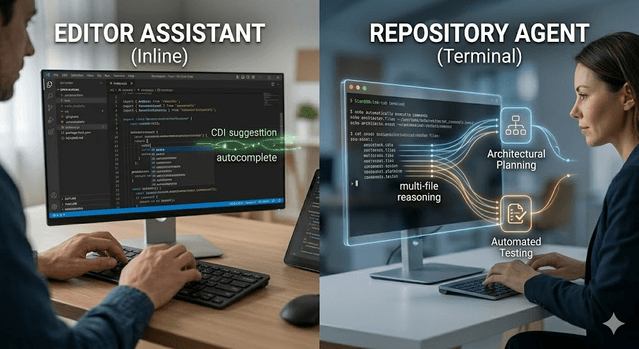
The tools have split into clear categories, and once I understood that split my setup got a lot simpler. Editor assistants like GitHub Copilot live inside your IDE and suggest code as you type. Repository-level agents like Claude Code and Cursor can read, plan, and edit across a whole project. Browser-based builders like Replit are for spinning something up fast. I stopped looking for one tool to do everything and started layering them so each one does the part it is actually good at.
1) Claude Code — Best for reasoning and complex codebases
When I have a genuinely hard problem — a refactor that touches a dozen files, or a bug I have been staring at for an hour in a state layer I did not write — this is what I reach for. It runs from the terminal, reads the repository, plans the steps, makes the changes, and runs tests, without me babysitting every line.
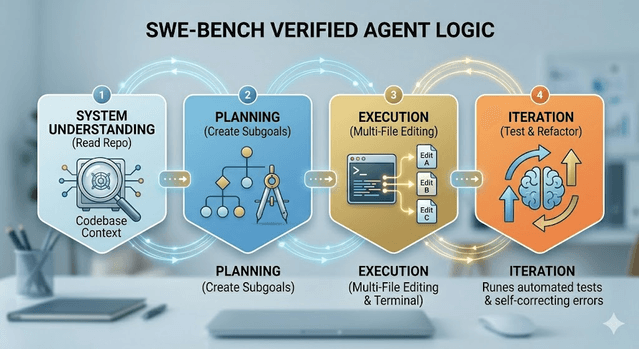
Its results on SWE-bench Verified (the benchmark built from real-world software engineering tasks) consistently lead independent rankings, and that roughly matches my experience: it is noticeably better at "think before you type" work like architecture and large refactors than the inline assistants.
Best for: Complex, multi-file work where reasoning matters — refactors, unfamiliar codebases, architecture decisions.
Pricing: Available through Claude Pro and Max plans. Free tier with usage limits.
Watch out for: It will happily over-engineer. My rule is to give it tight constraints ("change only this, do not touch the routing") and always read the diff before I accept it. A few times I let it run loose and it "helpfully" rewrote things I never asked it to.
2) Cursor — Best for daily coding workflow inside an IDE
Cursor is the one that lives closest to how I actually write code. It is basically VS Code with AI woven into the editor — visual diffs, fast autocomplete, and a chat panel for multi-file edits. When I am in a normal build-a-feature flow rather than fighting a hard bug, this is comfortable and quick.
It supports multiple underlying models, so I can switch to a stronger one when a task deserves it. For the bread-and-butter Flutter work — building out screens, wiring up widgets, small refactors — the in-editor loop keeps me moving.
Best for: Developers who want AI inside the editor instead of a separate terminal agent.
Pricing: Free plan available. Paid plans from about $20/month.
Watch out for: On big repo-wide changes I have found a terminal agent like Claude Code plans better than Cursor's in-editor edits. Cursor is where I write; Claude Code is where I think.
3) GitHub Copilot — Most widely adopted, easiest to start
If you do not want to change anything about your setup, Copilot is the lowest-friction way in. It installs as an extension in VS Code, JetBrains, Visual Studio, and more, and just adds suggestions on top of what you already have. It is where a lot of people should start, and honestly where I started.
Its real strength is the GitHub ecosystem — PR summaries, issue context, agent mode for scoped tasks. If your team already lives on GitHub, that integration is worth a lot.
Best for: Developers who want AI help without leaving their current IDE, and teams already on GitHub.
Pricing: Individual plans from $10/month. Business from $19/user/month.
Watch out for: For deep, multi-file reasoning it is outclassed by Claude Code and Cursor. It is fantastic at accelerating what you are already typing, less so at planning something new.
4) Windsurf — Rising challenger worth watching
Windsurf takes a Cursor-like approach but leans more autonomous and less interrupt-heavy. If Cursor's constant suggestion loop breaks your focus — which it sometimes does for me on long sessions — Windsurf's quieter, "take this task and run" style is worth trying. Its context handling is solid across frontend and backend.
Best for: Developers who want a more autonomous IDE session, especially for full-stack web work.
Pricing: Free tier available. Paid plans comparable to Cursor.
5) Replit — Best for rapid prototyping and non-engineers
Not everything needs a real IDE. When I want to test an idea or throw together a quick internal tool without touching my local setup, Replit lets me describe it, generate a first version, and deploy from the browser. It handles dependencies and hosting in one place.
Best for: Fast prototypes, proof-of-concepts, and people who are not full-time engineers but need something working.
Pricing: Free plan. Paid tiers for more compute. AI generation credits can burn fast on bigger projects.
Watch out for: I would not run a real production app on Replit-generated structure. It is a prototyping tool — treat the output as a starting point, not a foundation.
6) Aider — Best open-source option
Aider is a command-line assistant that connects to models via API (Claude, GPT, and others). Because it is open-source and model-agnostic, it is the option I point people to when they want full control and no lock-in. It does multi-file edits, commits cleanly through git, and shows you exactly what it is doing — which I appreciate when I am working on something I do not want leaving my machine.
Best for: Privacy-conscious developers, anyone who wants model flexibility, and folks comfortable in the terminal.
Pricing: Free and open-source. You pay for whatever model API you connect it to.
How I actually choose: match the tool to the task
No single tool wins everything, and trying to make one do it all is how I wasted money early on. Here is the layered setup that works for me:
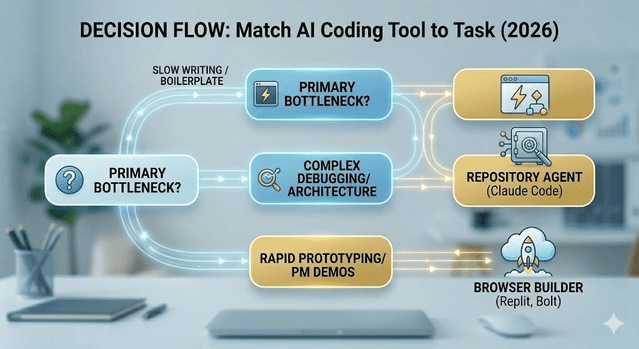
One tool for fast inline suggestions while I write (Cursor's autocomplete or Copilot). One tool for hard, cross-file reasoning (Claude Code). One quick path for prototypes (Replit). Before you pay for anything, figure out your actual bottleneck. If writing feels slow, start with Copilot. If debugging and architecture are what eat your day, start with Claude Code. If you just need a demo live by tonight, Replit.
Free vs. paid: when I actually upgrade
Free tiers are plenty for trying things out. I only pay for a tool once it clears a simple bar: I am using it every single working day, or its limits are actively blocking me on a larger project. And I do not stack overlapping tools — one good reasoning agent plus one good in-editor assistant covers almost everything I do across my Flutter projects.
Mistakes I made so you do not have to
The first mistake I made was judging each tool by the wrong job — expecting inline Copilot to do deep architecture, or getting annoyed that a reasoning agent was overkill for a one-line fix. Match the tool to the task and they all look a lot better.
The second one cost me real time: not reading the output. AI writes plausible code that quietly ignores your project's conventions or an edge case you care about. I now treat every generation as a first draft I have to review, especially anything touching state or platform-specific behaviour across iOS and Android.
The third is the one I warn junior devs about most: do not use AI to skip understanding. Early on I shipped code I could not explain, and debugging it later was miserable. Use these tools to move faster in areas you understand, and to learn faster in areas you are still figuring out — not to avoid learning entirely.
Where to start
If you already work in VS Code or JetBrains and just want a safe, cheap first step, GitHub Copilot. If you are building something genuinely complex and need real reasoning across a codebase, Claude Code is the one I would hand you first. Get one tool producing clear value, then add a second that covers a different layer. The goal is not to use more AI — it is to use the right one at the moment it saves you the most time.
Get Weekly AI + Tech Updates
Receive practical AI tools, workflows, and hand-picked resources in one concise weekly email.
Software Developer & Founder
MCA graduate and Flutter developer (web, Android & iOS), writing from hands-on experience with AI and productivity tools.
I'm Mohd Washid, a 23-year-old software developer. I hold a BCA (2022) and an MCA (2024), and I build cross-platform apps with Flutter for web, Android, and iOS. I started AI Tech Minty to share the AI and productivity tools I actually use in my day-to-day development work — cutting through the hype with practical, hands-on guidance you can act on the same day.